Computer-use agents compared: Claude, ChatGPT and Gemini
A model that can click, type and take screenshots is not the same as a chatbot. As of November 2026, Anthropic, OpenAI and Google all document computer-use tools — and all of them still expect you to run tight permissions and watch what the agent does.
Sponsored placement
This space is available for an education-friendly sponsor. No advertiser is listed here yet, and nothing here is an endorsement.
A chatbot answers in text. A computer-use agent asks to move a mouse, type, or take a screenshot, and then looks at what happened. Anthropic’s computer-use documentation describes this as a client-executed toolset: the model proposes actions, your application performs them, and you send the results back. Google’s official Computer Use announcement and Gemini API docs describe a similar loop — screenshot in, function call out, new screenshot back — for browser, mobile or desktop environments. That is powerful. It is also why “it can use my computer” is a security decision, not a demo setting.
OpenAI’s ChatGPT agent help is the product page to read if you meet this idea inside ChatGPT itself. Official material there describes agent mode as the place where browser capabilities that used to sit in a separate Operator product now live. OpenAI also documents a Computer Use path for desktop automation, including turning the feature on and approving apps, plus operating-system permissions. Treat those official pages as the current map: names have already moved once, and they can move again.
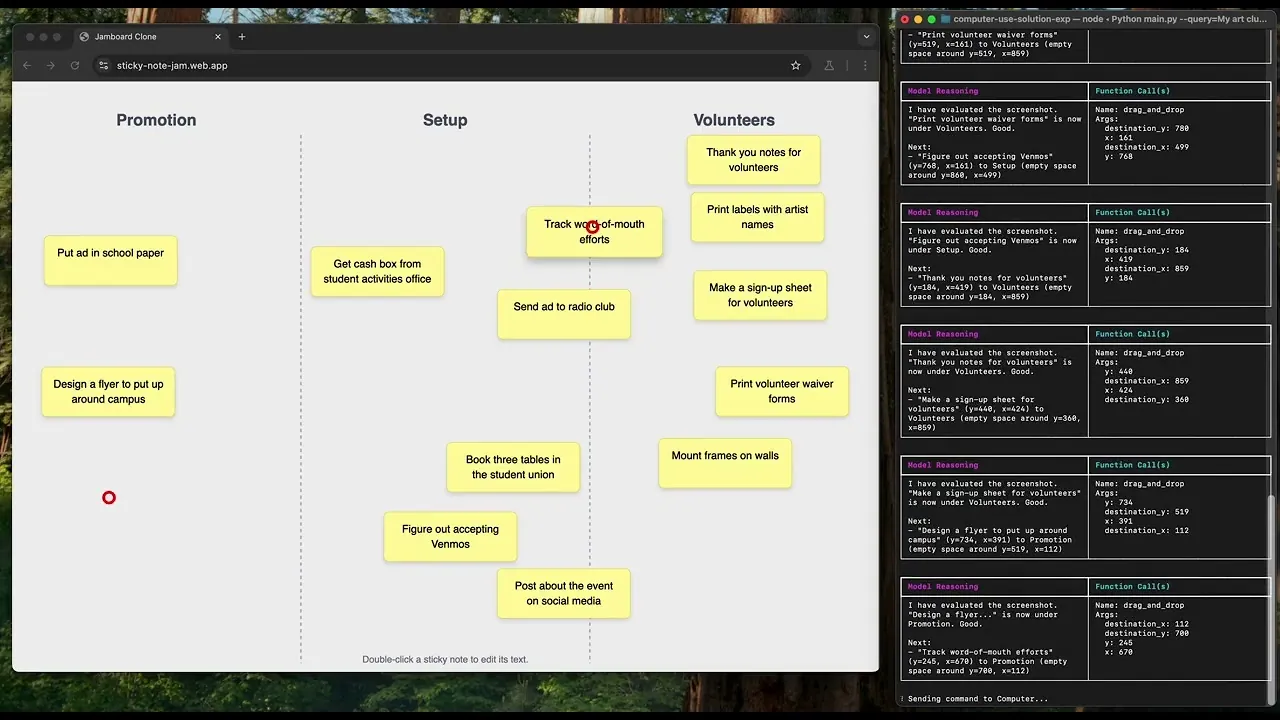
The comparison that matters is not which demo looks smoother. It is what the agent can reach, who executes the clicks, and whether a person has to approve the dangerous steps. If the environment can open your email or a bank, a mistaken or injected instruction can too — the same blast-radius point as in our prompt-injection guide and AI agents at work. The $10 AI Agent Permission Checklist is a practical way to walk through limits before you switch this on. Prices and exact model lists are omitted here on purpose: open the current official docs for the stack you are actually shipping.
Computer-use, as official docs describe it in November 2026
| Question | Claude Computer Use | ChatGPT agent / Computer Use | Gemini Computer Use |
|---|---|---|---|
| What the vendor documents | A client-executed computer-use toolset on the Messages API: the model can request screenshots, mouse and keyboard actions; your app runs them and returns results | ChatGPT agent is the consumer/work product that can use a browser (OpenAI says Operator’s browser capabilities moved here). Separate Computer Use docs describe desktop automation, including per-app approval and OS permissions | The Gemini API Computer Use tool: you send a screenshot and a task, the model returns a function call, your client executes it and returns a new screenshot |
| Where it runs | In an application you build or host that implements the tool loop described in Anthropic’s docs | In ChatGPT agent mode, and, for desktop Computer Use, in the official ChatGPT Computer Use flow (with app approvals). Developers have a computer-use tool in OpenAI’s agent docs | In an app you build against the Gemini API, in browser, mobile or desktop environments as Google’s current docs describe |
| A permission fact to keep | Your software executes the clicks. You decide what the environment can reach. | Official ChatGPT Computer Use material describes enabling the feature and approving apps, plus platform permissions such as screen recording or accessibility on a Mac | You execute the function calls. If the environment can open a site or an app, a bad step has that reach. |
| What this article will not do | It does not quote list prices or a frozen model menu. Read Anthropic’s current computer-use page before you ship. | It does not treat older ‘Operator’ branding as current. Use the current ChatGPT agent and Computer Use pages. | It does not claim one vendor’s demo is safer. Safety is the environment, the logs and the approvals you require. |
Comparison as of November 2026. Re-check each vendor’s official page before you buy or deploy.
Before you let anything click on your behalf
- Give the agent a narrow environment: a dedicated profile, a test site, or a machine without payment tools and production credentials.
- Require a human approval for anything that sends a message, spends money, or changes a live record.
- Log every action the client executes. If you cannot replay what was clicked, do not run it unattended.
- Prompt injection still applies. If the agent can read a page or a file, that page can try to instruct it. See our prompt-injection article.
Sponsored placement
This space is available for an education-friendly sponsor. No advertiser is listed here yet, and nothing here is an endorsement.
From the $10 shelf
AI Agent Permission Checklist — Thirty checks before you let an agent act on a desktop, a browser, email or payments, with four approval levels. Get the $10 checklist.
What to remember
- As of November 2026, Anthropic, OpenAI and Google all document computer-use tools that click, type or read screens under a tool loop you (or their app) execute.
- OpenAI’s help describes ChatGPT agent as the place browser-style ‘Operator’ capabilities now live; desktop Computer Use is documented separately, with app approvals.
- The distinctive risk is reach: a successful bad step can do anything the environment can do.
- Permissions, logs and a human check on high-impact actions are part of the design, not an optional extra.
Sources
Figures and product features in this article come from the public sources above, as of November 2026, and may have changed since. Follow the links for the latest details. This is not a recommendation to buy any tool.