The Model Context Protocol in plain words
MCP is an open standard for connecting an AI app to tools and data. The current specification still expects you to treat tools with caution and to ask before they run.
Sponsored placement
This space is available for an education-friendly sponsor. No advertiser is listed here yet, and nothing here is an endorsement.
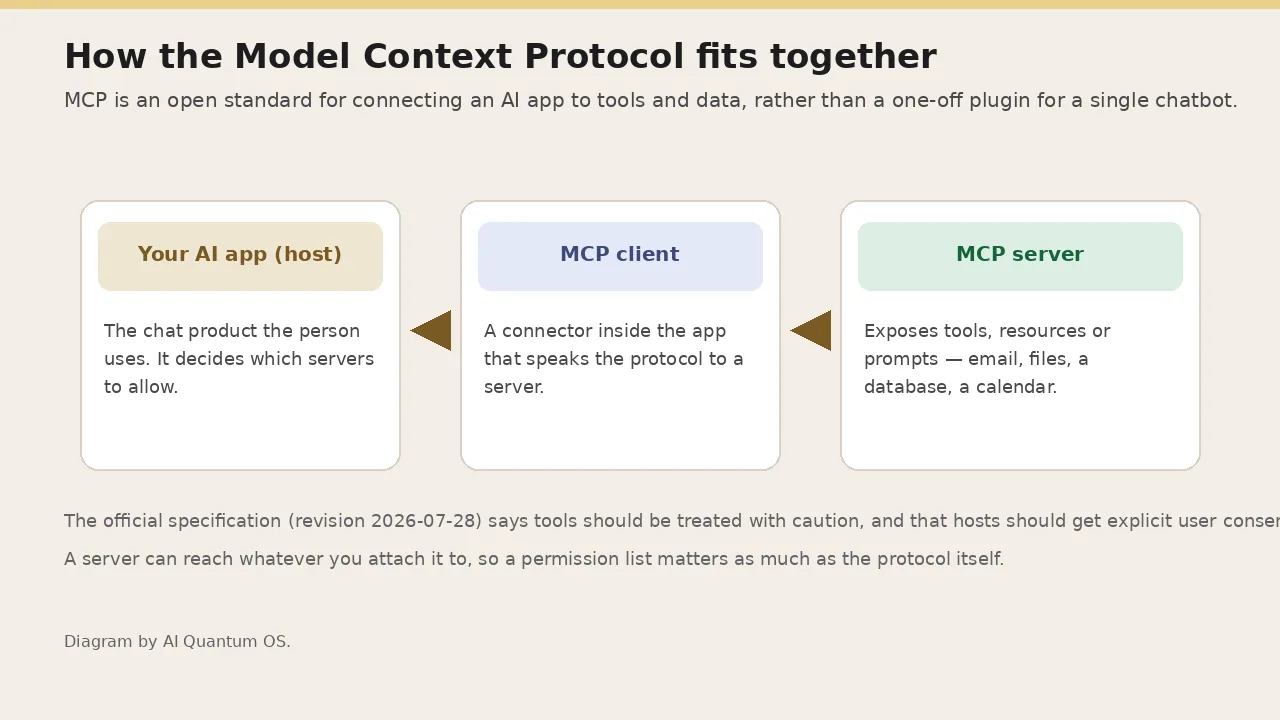
The Model Context Protocol, or MCP, is an open standard for hooking a language-model application up to tools and data: a mailbox, a file store, a database, a calendar, or a custom in-house service. Anthropic published the original introduction, and the authoritative rules live in the official specification. The current revision is dated 28 July 2026. In plain terms, your chat app (the host) talks, through a small connector (the client), to a server that offers tools, resources or prompt templates.
That standard matters because, until recently, every product invented its own way to “add a tool”. MCP is closer to a shared plug. Google Cloud Tech’s short explainer, below, shows how the pieces fit. The 2026 revision describes a more stateless, request-and-response style than the earlier session-based versions. You do not need those internals to use an app that already supports MCP — but you do need to know what a server is being allowed to touch.

The official specification’s security section is blunt. Tools should be treated with caution. Hosts should obtain explicit user consent before invoking a tool, and people should understand what each tool does before they authorise it. That is not a marketing extra. A server can read or change whatever account, folder or API you connect. Combined with prompt injection, a hostile document can try to talk the model into calling a tool you never meant to allow. Our article on AI agents at work is the wider picture; this one is about the plug itself.
Before you add an MCP server to a work or family account, write down what it can do, who must approve risky actions, and what happens if it misbehaves. The AI Agent Permission Checklist on the $10 shelf is built for exactly that review. For data that should not leave the machine at all, see privacy settings on popular AI tools and running a model locally.
What to check before you connect an MCP server
| Question | How to read it |
|---|---|
| What is MCP, in one line? | An open protocol for connecting an AI application to external tools and data. The current official revision noted in this article is dated 2026-07-28. |
| Who is supposed to approve tool calls? | The specification tells hosts to get explicit user consent before invoking a tool. If a host skips that, the risk sits with the host, not the protocol name. |
| What can a connected server reach? | Whatever you attach it to. Permissions and logging matter as much as the protocol itself. |
Sponsored placement
This space is available for an education-friendly sponsor. No advertiser is listed here yet, and nothing here is an endorsement.
From the $10 shelf
AI Agent Permission Checklist — Thirty checks and four approval levels before you let an agent touch email, files or payments — the practical companion to an MCP setup. Get it now.
What to remember
- MCP is an open protocol for connecting an AI application to external tools and data.
- The current official revision is dated 2026-07-28; earlier revisions used a different session model.
- The specification tells hosts to get explicit user consent before invoking a tool.
- A connected server can reach whatever you attach it to, so permissions matter as much as the protocol.
Sources
Figures in this article come from the public sources above and may have changed since. Follow the links for the latest numbers.